

This guide discusses how to chain pivots together to reach networks several layers deep from our starting host.
Following Along
I have an easy-to-use Lab on GitHub if you would like to follow along on a Linux machine. Setup is simple. Install docker-compose and run the following command:
sudo ./start_lab.shThis will setup multiple docker hosts, each on various subnets. This will allow us to play around with pivoting across hosts.
When finished, you can run
sudo ./stop_lab.shThe Environment
The lab environment consists of the following:
- host1 (entry host exposed locally on port 2222)
- 172.16.222.11/24
- 172.16.15.11/24
- host2
- 172.16.15.22/24
- 10.5.4.22/24
- host3
- 10.5.4.33/24
- 10.7.8.33/24
- host4
- 10.7.8.44/24
- 10.77.88.44/24
- host5 (utilized later in this module)
- 10.77.88.55
Network access is linear across the hosts:
host1 ↔ host2 ↔ host3 ↔ host4
Our first goal of this module is to directly connect host1 to host4 using SSH and SOCKS. Now that the stage is set, let’s begin!
Setting Up Our First Dynamic Forward
We begin by connecting to our first host using the following command:
ssh -p 2222 sam@172.16.222.11Each host will use the following credentials:
username: sam
password: iam
We will setup our first local Dynamic port forward with SSH using the following command:
ssh -D 9050 172.16.15.22This create a local SOCKS server and listens locally on port 9050. If we use proxychains with our local port 9050, it will tunnel our traffic through host2, giving us access to host3.
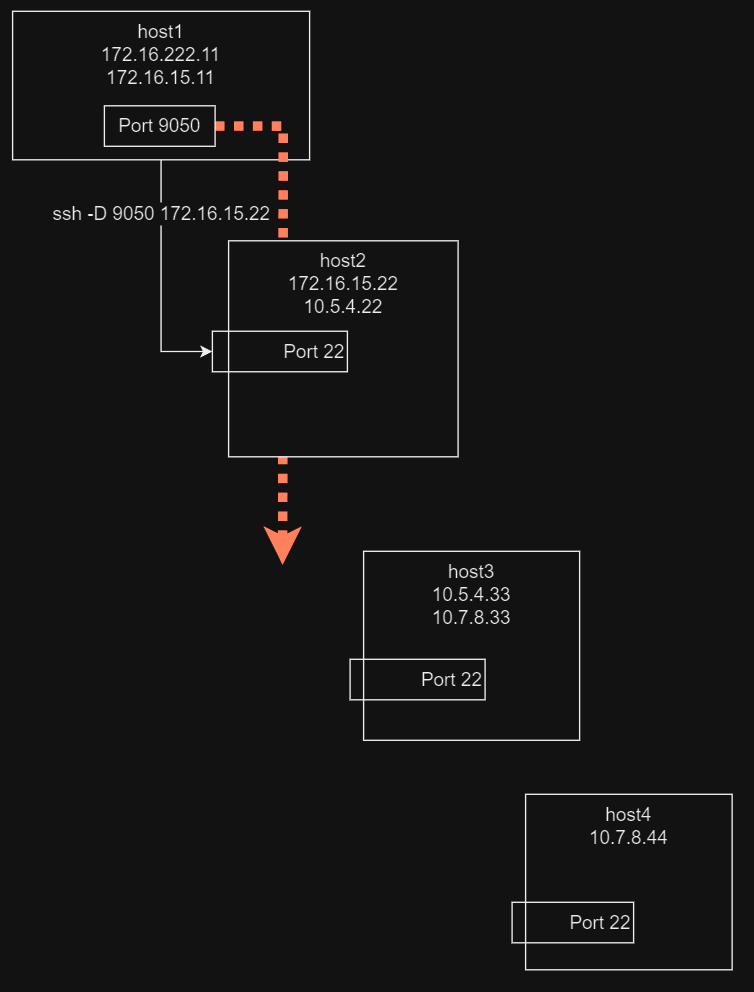
Our First Pivot
Using our local SOCKS port, we can now use proxychains to gain access to the next host. To use our local SOCKS port, we have a proxychains config (pivot-host2.conf) that contains the following SOCKS proxy:
# pivot-host2.conf
...SNIP...
socks5 127.0.0.1 9050
In a separate terminal, run the following:
proxychains -f pivot-host2.conf ssh 10.5.4.33Using the pivot host (host2), we can now access host3. Unfortunately, this does not achieve our ultimate goal of reaching host4 from host1.
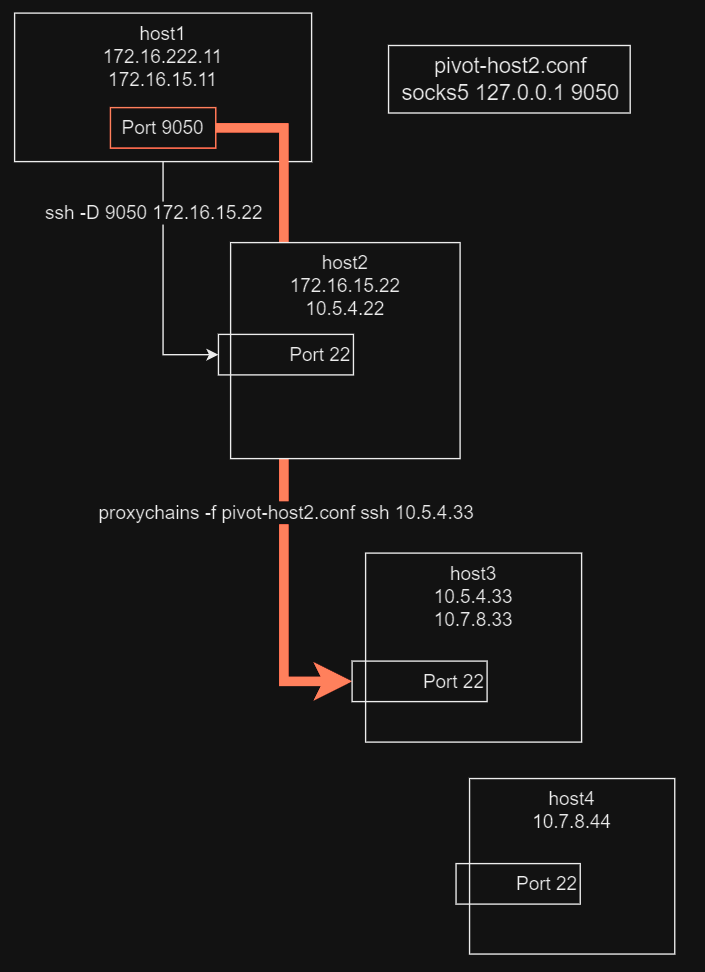
Our Second Pivot
We can alternatively setup our pivot host to be host3 so that we can access host4. Let’s see it in action.
Using our previous session with host2, setup our Dynamic port forwarding with host3:
ssh -D *:9050 10.5.4.33Take note of the *:9050
Without the asterisk, SOCKS is by default available only locally.
By specifying *, we can access the port externally on all interfaces.
Our network configuration now looks like this:
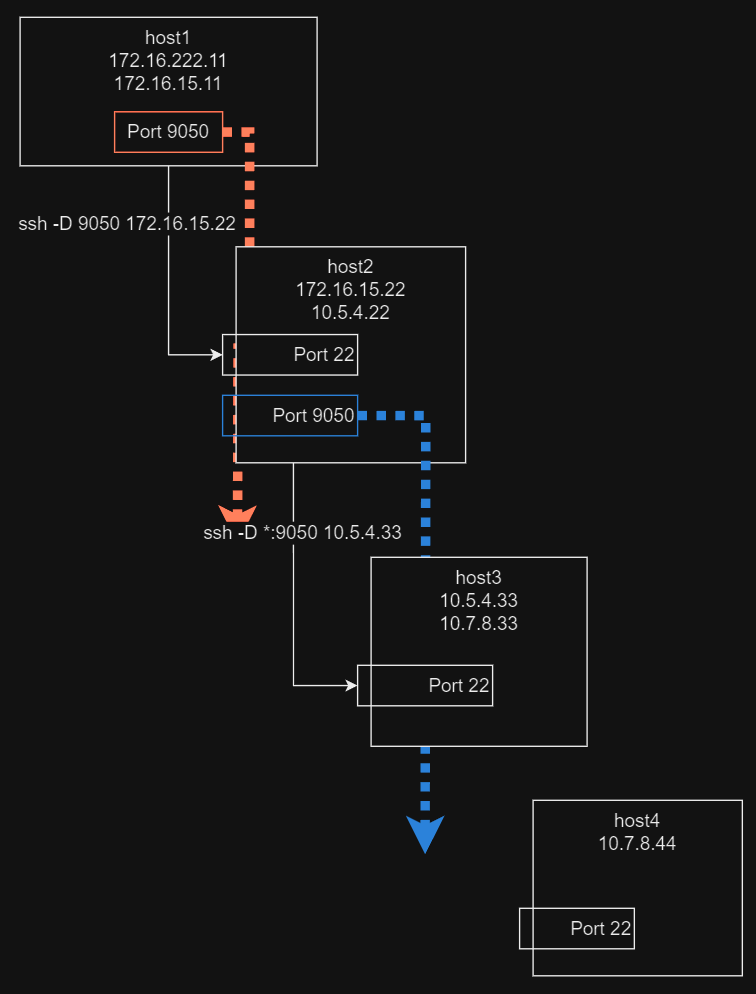
Achieving Our Goal
Now we would like to utilize host2 as our SOCKS proxy to access. We will use a separate proxychains config (pivot-host3.conf) to access host4:
# pivot-host3.conf
...SNIP...
socks5 172.16.15.22 9050
Now that we are configured to use host2, execute the following command:
proxychains -f pivot-host3.conf ssh 10.7.8.44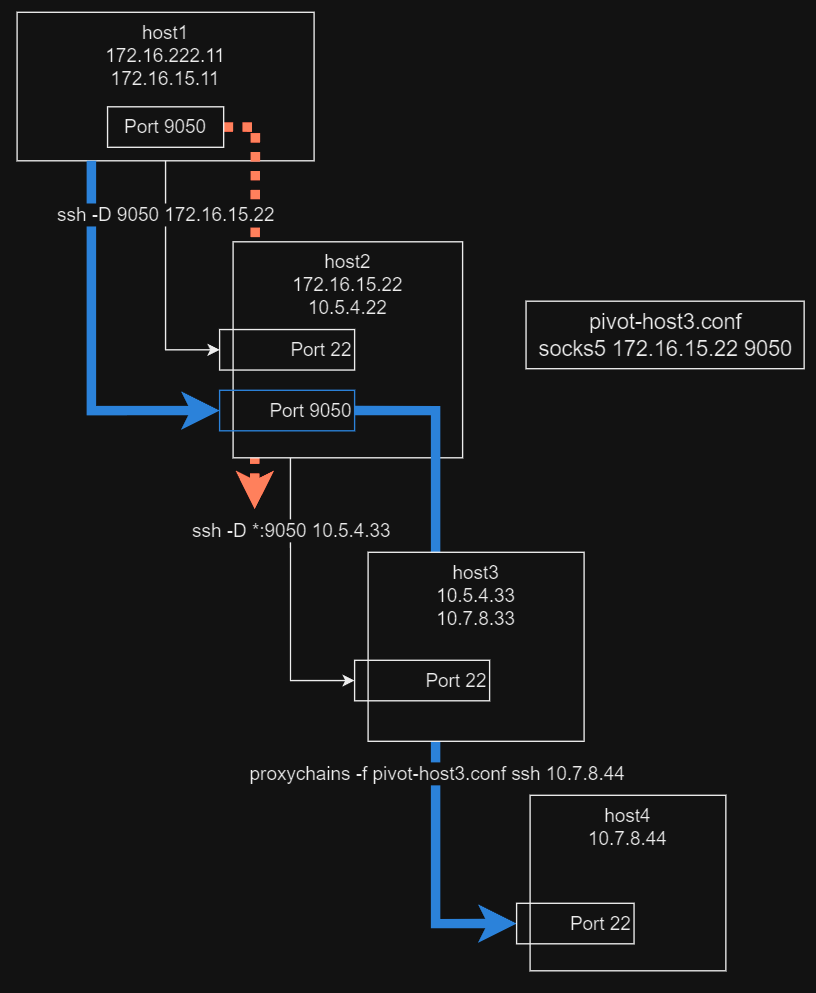
We did it! You should receive a password prompt, confirming that you have access to host4 from host1.
Chaining Pivots
Now that we have utilized a single pivot, let’s delve deeper and get into pivot chaining.
We now introduce host5. Our new goal is to directly connect from host1 to host5. To achieve this, we perform the following:
- Use our existing pivot on host2
- Create a new pivot on host4
- Use a proxychains config that chains the pivots together, granting us access to host5
Here is the layout for gaining access:
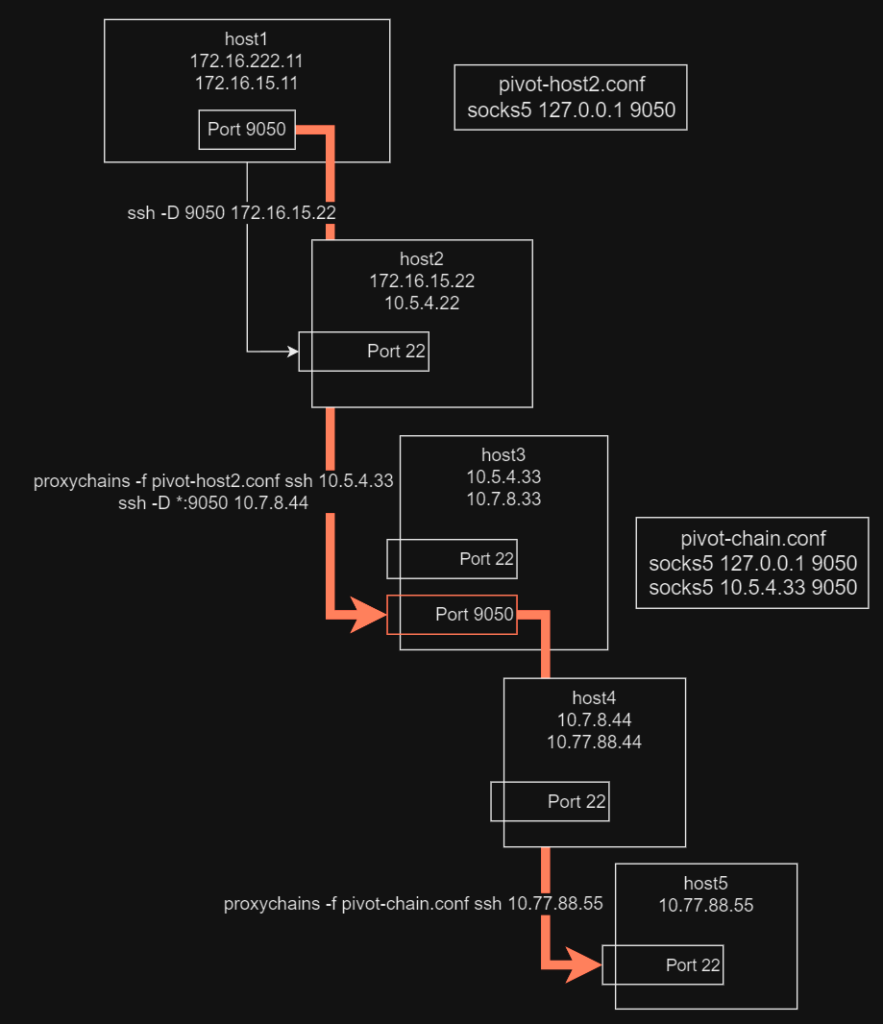
To setup a pivot on host4, simply run the following in a new terminal from our entry host (host1):
proxychains -f pivot-host2.conf ssh 10.5.4.33
ssh -D *:9050 10.7.8.44
We can now use a new proxychains config (pivot-chain.conf) to chain the proxies together:
# pivot-chain.conf
...SNIP...
socks5 127.0.0.1 9050
socks5 10.5.4.33 9050
From host1, we can now access host5 with the following command:
proxychains -f pivot-chain.conf ssh 10.77.88.55Wrap Up
Give yourself a pat on the back. We successfully pivoted 4 networks deep. You can utilize this knowledge to go deeper or change your approach. There is more than one way to accomplish the same goal.
As you modify proxychains config files, be mindful of the mode that is set within. If you have “strict_chain” enabled, each proxy is required with the order provided.
Pro Tip
Drawing out the network layout can be very helpful for visualizing and properly setting up your pivots.
I hope you enjoyed this session! Hack responsibly and I’ll catch you in the next blog post!